“Loop engineering” has become a trending topic in the past month, after some high-profile folks at Anthropic and OpenAI revealed that they have stopped writing prompts, and started designing loops. At Anthropic’s developer conference, Boris Cherny, creator of Claude Code, said (emphasis mine):
“I don’t prompt Claude anymore. I have loops running that prompt Claude and figuring out what to do. My job is to write loops.”
Soon after, Peter Steinberger, creator of OpenClaw, preached loop design in a post:
Elsewhere, Addy Osmani, formerly of Google, wrote an article, ‘Loop Engineering’:
“Loop engineering is replacing yourself as the person who prompts the agent. You design the system that does it instead.”
That’s three mentions in quick succession of this new approach, which is a novel one and therefore pretty abstract to me. To find out more, I turned online to some of the folks who read these articles. In replies, you told me what “loop engineering” means to you and gave some examples of loops in your work.
Today, we cover:
-
Where it began: “Ralph Wiggum” loop. A year ago, software engineer Geoffrey Huntley shared how he builds “loops.” In December, the approach went viral and “Ralph loops” were born.
-
The /goal command ships in all major harnesses. By May this year, the major AI coding harnesses added support to run a loop from a single prompt, using the /goal command.
-
Loops which devs use: triggers and cron jobs. I asked devs how they use loops. Most use cases involve responding to events or running scheduled jobs. They are useful, but don’t feel like brand new workflows.
-
Helpful loops for devs. Open PRs for newly-recorded app issues, have notes ready when an oncall joins an outage Slack channel, “babysitting” and fixing nightly end-to-end tests, and more.
-
Disappointment and “tokenmaxxing”. Several devs reject looping after trying it. Agents drifting, and the “human in the loop” having better results are some reasons. Also, at companies that pay API prices for tokens, loop engineering gets expensive fast.
-
Was looping a hack while tooling caught up? Distinguished engineer Max Kanat-Alexander believes the “loop” might have just been a temporary hack while the harnesses added the ability to do the same from a single prompt.
-
Does “context engineering” matter more for devs? Except for engineers building AI infra, there seems little benefit in going deep into loop engineering. Instead, becoming familiar with AI context windows – also part of building loops – could be more useful.
Exactly a year ago, software engineer Geoffrey Huntley published the article ‘Ralph Wiggum as a software engineer’. The name references the naive son of the local police chief in The Simpsons, who is extremely eager to always be helpful. In engineering, “Ralph” is intended to continuously nudge the agent in the right direction. Geoff described it:
“Ralph is a technique. In its purest form, Ralph is a Bash loop:
while :; do cat PROMPT.md | claude-code ; done
Ralph can replace the majority of outsourcing at most companies for greenfield projects. It has defects, but these are identifiable and resolvable through various styles of prompts.
That’s the beauty of Ralph – the technique is deterministically bad in a nondeterministic world.”
The article expands on the idea of the Ralph loop:
-
Start the agent with a prompt that captures the task and defines a goal
-
Create a plan of work, each item with a success criteria
-
Start the loop:
-
Take one item per loop
-
When the agent is done, check if the goal is achieved
-
If not: start the agent again, with a clear context window
-
Geoff published the experiments he did with this approach, such as building a new programming language last summer, and said it requires skill:
“Engineers are still needed. There is no way this is possible without senior expertise guiding Ralph. Anyone claiming that engineers are no longer required and a tool can do 100% of the work without an engineer is peddling horses***.”
The “Ralph method” blew up late last year with the arrival of better models which were surprisingly capable of building ambitious projects. Software engineer Matt Pocock created a tutorial, ‘Ship working code while you sleep’ with the Ralph Wiggum technique. He said:
“One of the dreams of coding agents is that you can wake up in the morning to working code, where your coding agent has worked through your backlog. It has spit out a whole bunch of code for you to review, and it works.”
Before the Ralph loop, Matt did this in two steps:
-
Ask the agent to create a detailed plan for the work, with tasks broken out
-
Then, in a sequential order, have the agent complete each subtask in a separate run
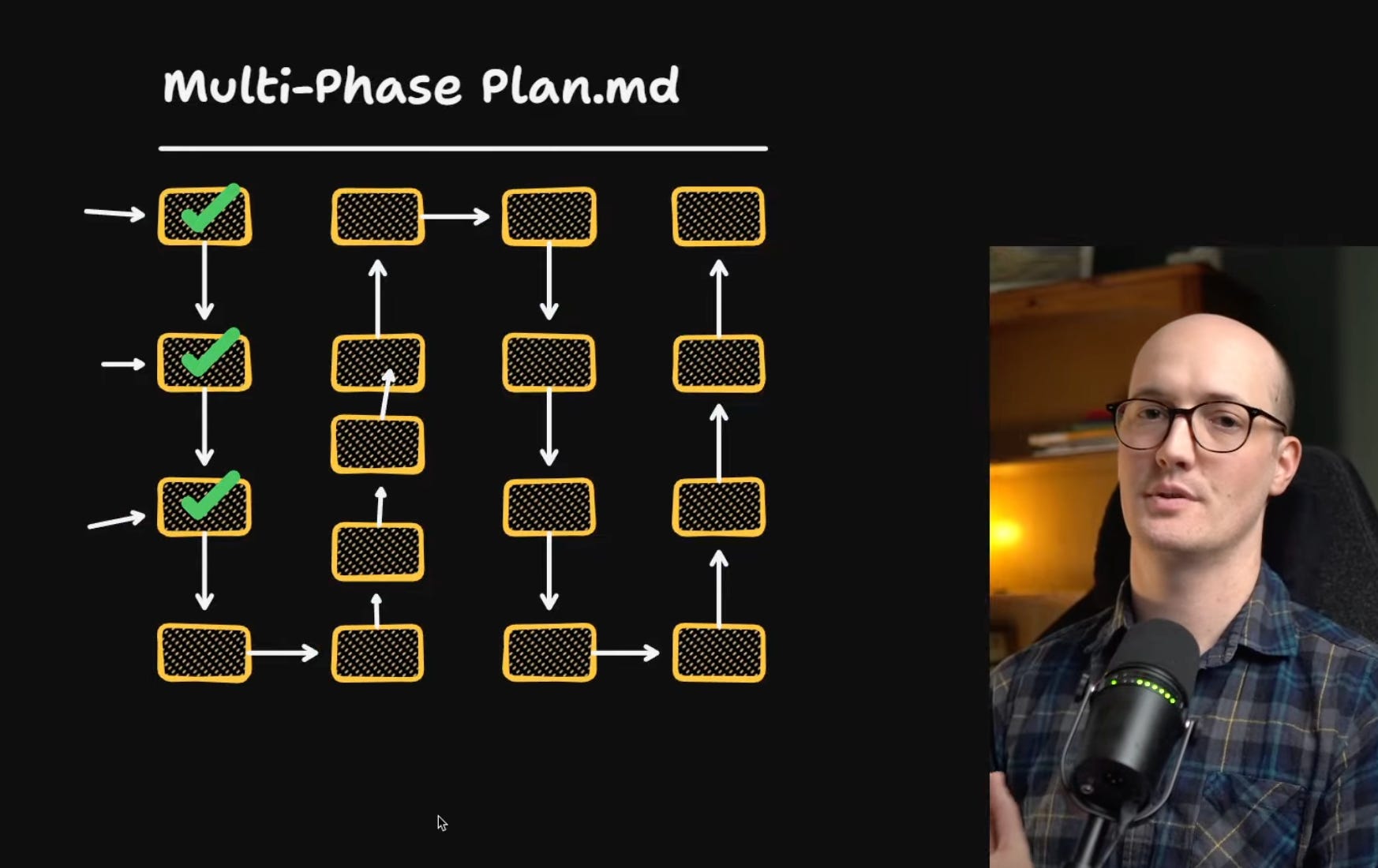
A problem with this approach is there’s no easy way to add new tasks to the “masterplan”. Software engineers know that most plans do need to be modified, often while the work is ongoing. In contrast, with Matt’s take on the Ralph method, the “masterplan” is continuously updated in a “master PRD”. Here’s the prompt he gives the agent:
-
Choose the next feature: Find the highest-priority feature to work on and work only on that feature
-
Have tests pass: check that the tests pass (via pnpm test)
-
Update the master tracker: update the PRD with the work done
-
Log work: append your progress to the progress.txt file
-
Commit: make a git commit of the feature
This style of working is more of a “dynamic Kanban”:
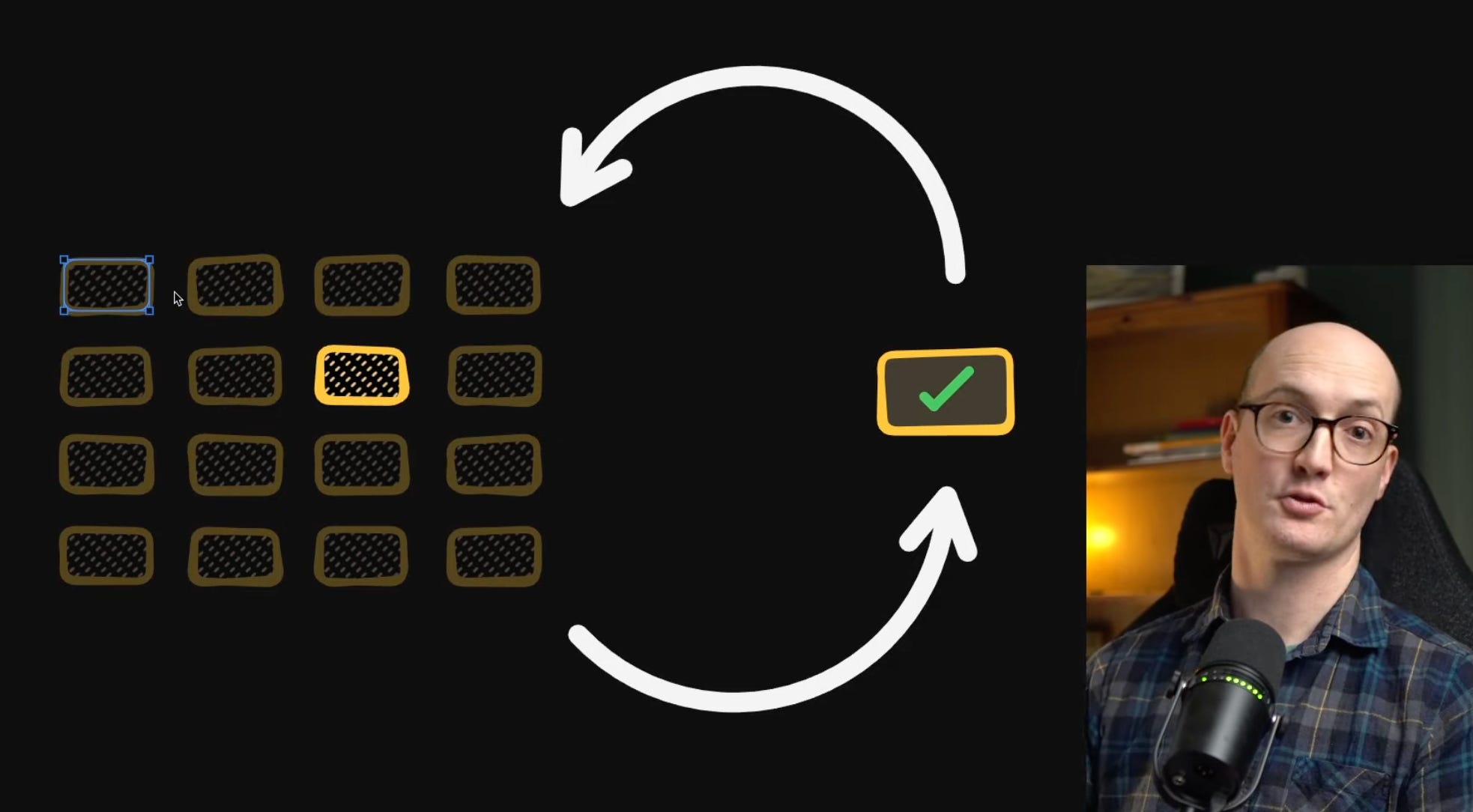
The “Ralph method” is all about working around context window limitations. Back in mid-2025, the maximum size of a context window was around 200,000 tokens. That’s not enough for more ambitious tasks, so it’s necessary to break up agent runs into smaller ones and run them, one by one. In this context, here’s where the Ralph method works:
-
Have a goal for a project, and keep running (or re-running) agents until this goal is reached
-
Persist work done in a “compressed” manner on the filesystem (as logs or an updated plan)
-
Start agents with fresh context to minimize “context rot”
-
Allow each agent to add or modify the “masterplan” if needed
For a few months, building a Ralph loop meant doing it yourself: setting up the loop, state tracking, deciding how the agent can add tasks and when to stop. But things changed once coding harnesses made it easy to run these loops.
About six months after the “Ralph technique” started gaining wider traction, Codex shipped the “Goals” feature in Codex. From the documentation:
“Goals are persistent objectives in Codex that keep a thread working toward a defined outcome across turns. A Goal gives Codex a completion condition: what should be true, how success should be checked, and what constraints must stay intact.”
Also from the docs (emphasis mine):
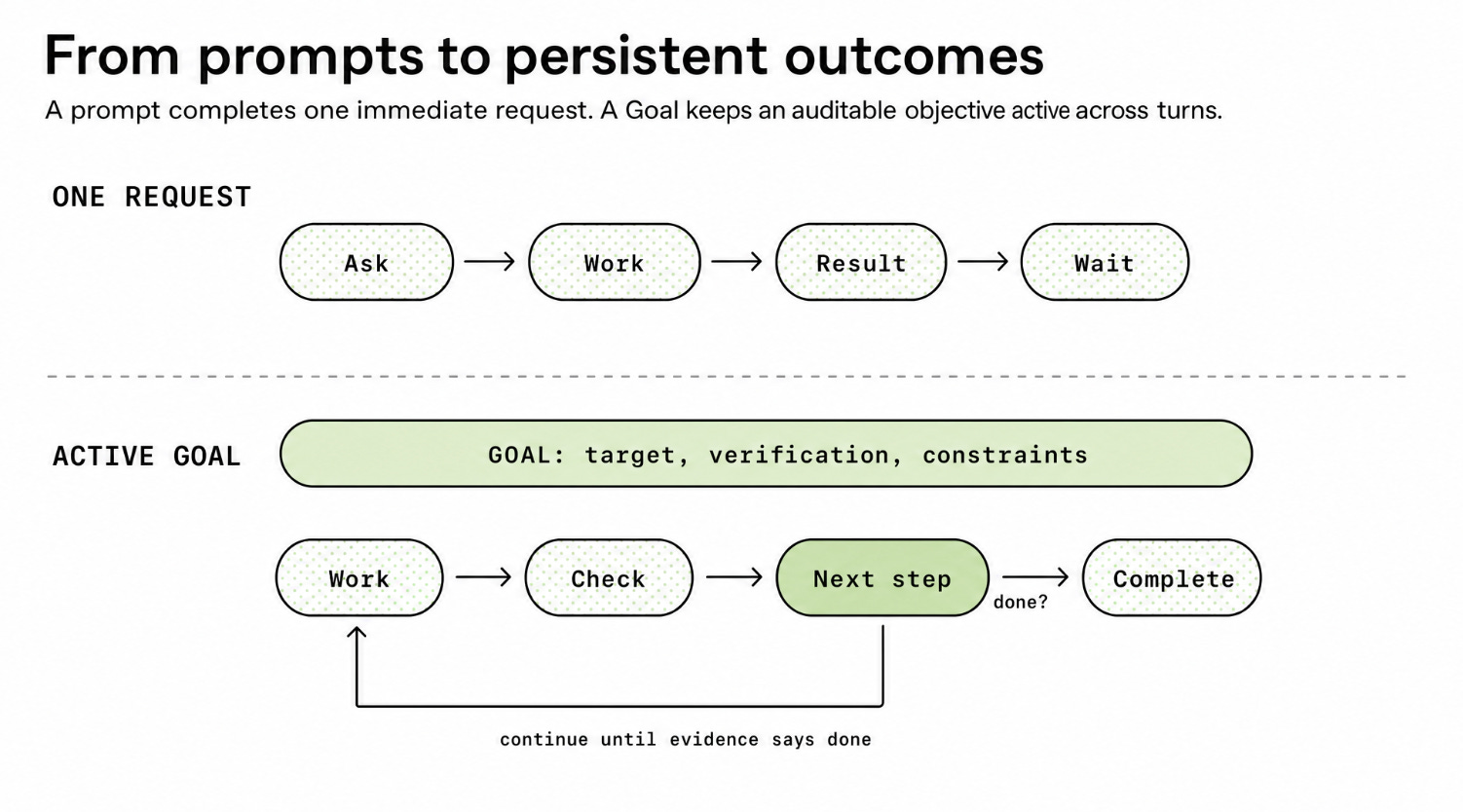
“A normal prompt says: do this next thing.
A Goal says: keep working until this outcome is true. In a normal request, Codex works through the immediate instruction, reports a result, and waits. With a Goal, Codex has a durable target attached to the thread. After a turn finishes, it can inspect the current evidence and decide whether the objective is satisfied. If the answer is no, and the Goal remains active and within budget, Codex can continue from the latest state.”
A visual representation:
Here’s an example of using a goal in Codex:
/goal Reduce p95 checkout latency below 120 ms on the checkout benchmark while keeping the correctness suite green
That’s a clear enough “end criteria” to just hand off to the agent, which then breaks up the task, spawns subagents, and runs until complete. So, how did OpenAI build Goals? They used files, logs, running tests, and lifecycle controls:
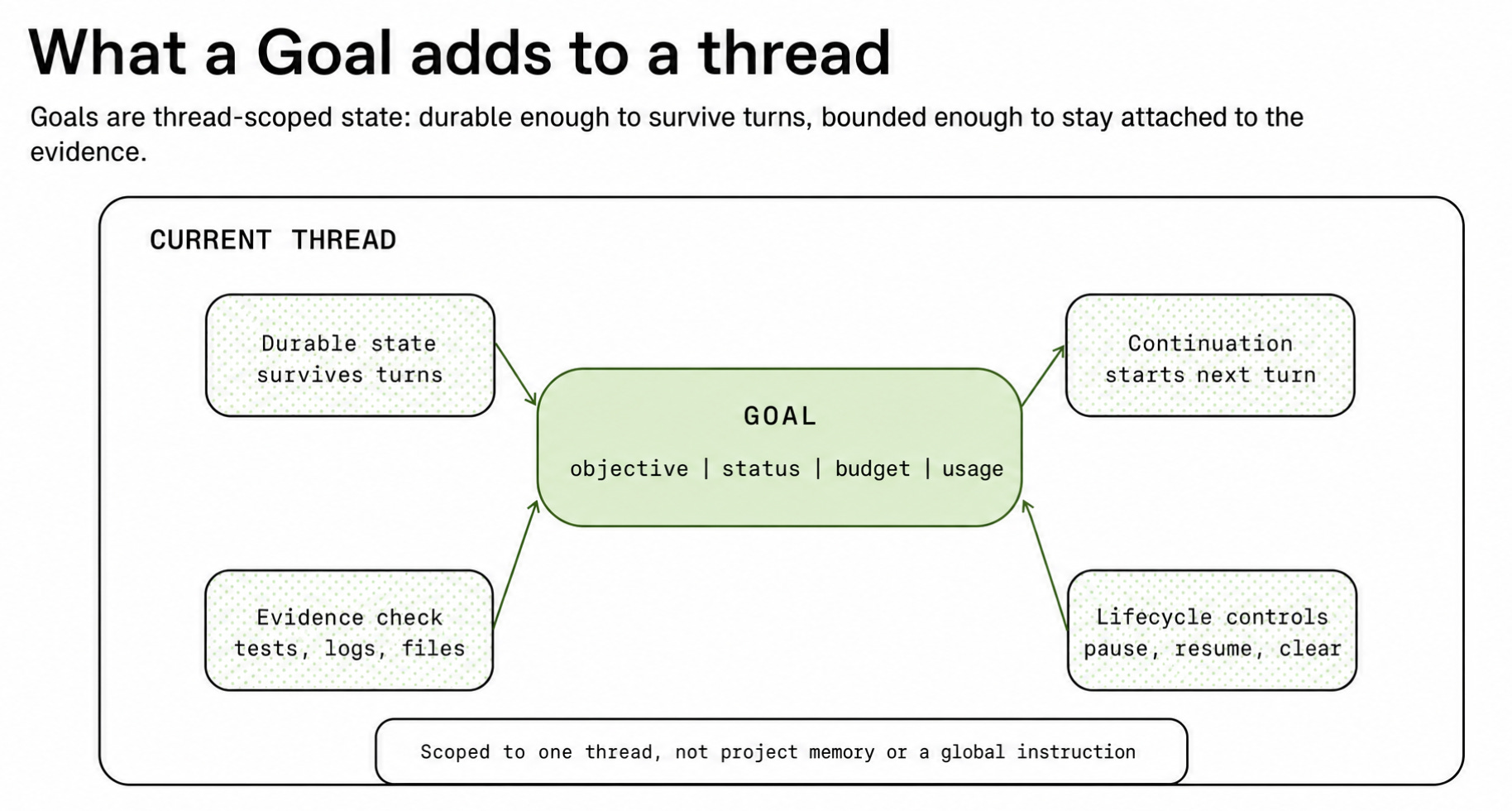
In this way, “Goals” feels awfully similar to a Ralph loop, except compressed into a single command! It feels like the Codex team took the idea of the Ralph loop, built infrastructure around it, took care of coordinating agents by not having them step on one another, dealt with state, running of tests, starting and stopping agents, and then added functionality such as being able to set a budget.
Three days later (May 2), Hermes agent, a popular AI agent framework and OpenClaw rival, shipped their implementation of /goal. From the docs:
“[/goal] It’s our take on the Ralph loop, directly inspired by Codex CLI 0.128.0’s /goal by Eric Traut (OpenAI). The core idea — keep a goal alive across turns and don’t stop until it’s achieved — is theirs. The implementation here is independent and adapted to Hermes’ architecture.”
Less than two weeks later – on 12 May – Claude Code also shipped their /goal command. It’s identical in what it does to Codex. From Claude Code:
“The /goal command sets a completion condition and Claude keeps working toward it without you prompting each step. After each turn, a small fast model checks whether the condition holds. If not, Claude starts another turn instead of returning control to you. The goal clears automatically once the condition is met.”
A few months before, in March, Claude Code shipped the concept of scheduling an agent with the /loop command. It is basically what JavaScript’s setTimeout() function would be equivalent to: repeat a task after a given interval until the work is done.
By May, running a Ralph loop had become as simple as giving a single command in one of the major agent harnesses. It’s as if AI labs noticed user demand to do more with agentic loops which were hard to set up, and built ways to make it simpler. For instance, in open source agent harnesses like OpenCode, there are plugins like the /goal plugin. For the minimalist coding agent, Pi, the /goal command can be added as a package.
By May, we had access to the /goal primitive. So, what use cases were Boris Cherny and Peter Steinberger referring to in terms of spending most of their time on designing loops, instead of writing prompts? I asked around for examples of “loop engineering” from fellow devs. Based on ~210 replies, mostly from X and LinkedIn, it seems that triggers and cron jobs are two very common use cases for loop engineering:
Triggers / automations: an agent kicks off when an event happens. The event could be an error being logged, a new ticket created, customer support feedback received, etc.
Pre-AI, these events were typically triggered by a webhook, and kicked off things like a Slack bot posting in a channel, triggering a system, or being the starting point of a Zapier or an n8n integration.
Cron jobs: many devs see “loop engineering” as kicking off jobs that involve agents on a cadence. This is fundamentally the same as scheduled cron jobs. From director of engineering, Oded Messer:
“The idea is that strategic workflows that are repeatable and automatable can be done so with an agent. OK. But if my strategic workflow is automatable then it either becomes tactical if the AI is capable enough or it’s just a high level old-school-automation I can set up like a cron or a trigger.
The name suggests simplicity and repetition. Sometimes it feels like AI enthusiasts forgot automation was a thing before LLMs.”
Below are some workflows with AI agents that run on a regular basis as a /loop command, or when triggered:
Open PRs for newly recorded app issues. Software engineer Ivan Pantić:
“App encounters a problem and creates a sentry issue. Then:
→ Cron tells agent to check sentry and open PRs.
→If there’s no active PR, agent tackles the issue and creates one
→ If PRs aren’t reviewed, agent pings the devs via slackIn this flow, there is only one PR open at a time.”
Fix flakey tests. Paul D’Ambra, software engineer at PostHog:
“/loop pull the next flakey test from the trunk API. run it to check if it flakes locally, if it does open a PR with the fix… which netted me 13 PRs to stabilise some of our tests.”
Triaging issues and outages. Software engineer Ivan Abad:
“A new alert/exception pops up in a channel.
→ The agent investigates the issue
→ if it is a code change, implements the change
→ creates the PR
→ pings the human for review.Same applies for customer tickets or incidents. By the time you get paged and connect to the incident the agent already triaged everything and often located the root cause.”
Review design plans. Artem Nikitin, software engineer at Elastic:
“What I’m finding myself doing often recently is to review design/implementation plans in a loop.
Usually, agents only find a few issues during a normal run and then find more on subsequent runs.
So I’m now asking them to run in a loop until they find 0 new major issues.”
Daily product improvements. Jack D, founding engineer at Schematic:
“We have a loop which reads the logs for the last 24 hours, user feedback and makes PR with fixes – we still review the PRs it makes though!”
Nightly end-to-end test run babysitted by an agent. Utku K, engineering manager:
“nightly e2e runs on the frontend app. When a test fails, an agent investigates first to work out whether it’s a real regression or a false negative. If it’s a real bug, the agent attempts a fix, reruns the test, and keeps iterating until it passes or hits a retry cap and escalates… Either way it lands as a PR ready for review by morning.”
Build new telemetry integrations and verify they work. Lawrence Jones, software engineer at Incident.io:
“A lot of the AI runbook that we use to build new telemetry integrations uses loops such as executing the query, verifying that it executed correctly and iterating on the query plan/output format/whatever until it is happy with the outcome.”
Do a long-running migration, mostly autonomously. Startup founder Rafel Mendiola:
“Recently, I converted my startup’s codebase from a regular React app to a React Native app using Expo.
There are two ways I could have done it:
-
In the traditional software engineering style, I could have created a large epic with 50-100 different tickets. I started building myself the infrastructure for that, it felt like it was way too much work.
-
What I did instead was create a skill that would let an agent figure out a small to medium-sized piece of work or piece of code to convert, given certain detection mechanisms and guidelines, and then do that conversion and keep track of the migration progress. Then I put that skill on a cron job. This was a lot easier to handle cognitively than managing a large migration plan. It also ran every 30 minutes, not nightly or weekly.”
Daily tasks executed. Aaron Stannard, creator of Akka.NET: