In a hyper-competitive market, inclusive design is no longer a “nice to have” part of modern solutions. Whether you make your users feel truly included can make an enormous difference in your user engagement and business progress — implementing inclusive design is a must for product designs to compete in the modern software market by reaching all users, regardless of their abilities and diversity factors. Modern inclusive design is evolving beyond traditional accessibility considerations and general inclusive design tactics with neurodiverse UX design and AI-powered adaptive UX, adaptive personalization, and multimodal UX.
Let’s explore what inclusive design is, its benefits, how to embed true inclusivity in the products you design, and how to think beyond general inclusive design concepts with neurodiverse UX and AI-powered adaptive UX design techniques to build successful digital products.
TL;DR
- Inclusive design is no longer just about access: Modern products need to support different abilities, identities, cognitive styles, environments, and ways of interacting.
- Accessibility is the foundation, not the finish line: A product must first be usable and accessible before it can truly feel inclusive, personal, or adaptive.
- Neurodiverse UX is becoming central to inclusion: Reducing cognitive load, visual noise, ambiguity, and unnecessary pressure can make products work better for users with ADHD, autism, dyslexia, dyscalculia, and beyond.
- Representation still shapes belonging: Inclusive visuals, flexible identity fields, localized experiences, and name-friendly forms help users feel seen instead of forced into narrow defaults.
- Adaptive UX is where inclusive design is heading: AI-powered personalization, multimodal interfaces, and context-aware design can help products adjust to users instead of expecting users to adjust to the product.
Editor’s note: This article was extensively updated by LogRocket author Shalitha Suranga in July 2026 to include a broader, more modern view of inclusive design, with expanded guidance on neurodiverse UX, cognitive accessibility, AI-powered adaptive UX, adaptive personalization, and multimodal product experiences. The updated version also adds new examples, diagrams, and practical design considerations to help teams create products that work better for users across different abilities, cognitive needs, devices, environments, cultures, and contexts.
What’s inclusive design?
Inclusive design is all about understanding people’s unique backgrounds and creating designs that foster a sense of belonging. Depending on where your users are coming from, they might have different needs and expectations. Sometimes, as subtle details as including the right colors in your illustration might impact whether they feel included or excluded.
It’s also about removing all possible demographic-related friction. It ranges from catering to various disabilities to ensuring adequate options when configuring user profiles so everyone’s identities feel represented.
If a product adheres to inclusive design, it will create a friendly and productive experience for:
- Users with permanent, temporary, or situational physical disabilities
- Users with different neurological conditions: ADHD, autism, dyslexia, or similar conditions
- Users who access the product in different environments, devices, and network conditions
- Users with various demographic factors. e.g., age, gender, location, ethnicity, etc.
Inclusive design is a way to create a better UX by respecting every unique user.
The difference between inclusive and accessible design
The difference between inclusive and accessible design might sometimes be a bit murky. To put it in simple terms, you can’t have a truly inclusive design without ensuring accessibility first. A genuinely inclusive design requires three elements:
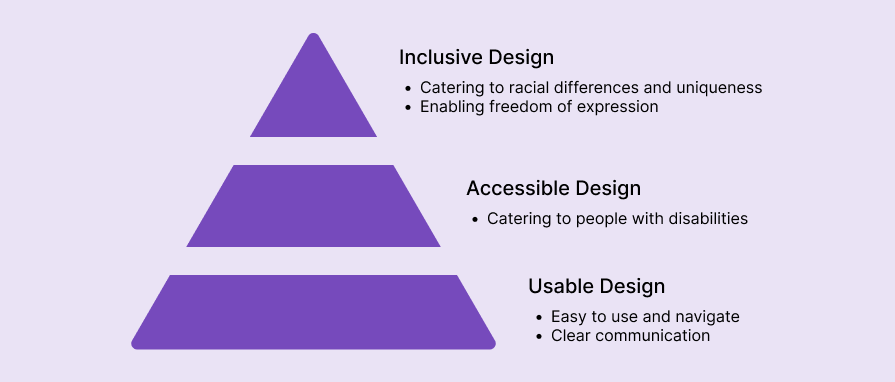
You start by ensuring usability. Your design must be understandable, easy to use, and include clear communication. Without usability, you’ll automatically exclude less tech-savvy users who might have problems figuring out how to use the product.
Then, you ensure accessibility; that is, catering to people who might experience various disabilities, be they permanent, temporary, or situational. It includes things like:
- Allowing font and contrast adjustment for sight-impaired users
- Following WCAG accessibility standards
- Supporting screen readers
- Making the product usable even with one hand
If your product isn’t functional for people with disabilities, they are, by default, to some extent excluded by you.
Once you cover both the usability and accessibility parts of the pyramid, you can bring inclusivity to the next level by catering to racial, demographic, and personal differences and expectations.
Covering all three parts is essential to building a product that’s truly for everyone.
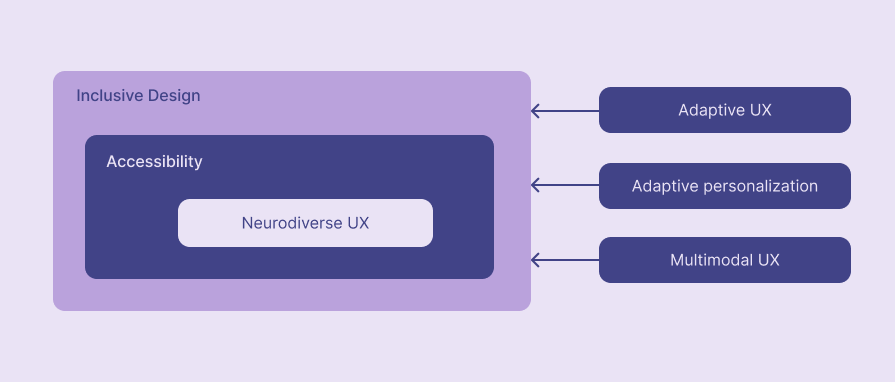
Relationships among inclusive, accessible, neurodiverse, and adaptive design
Modern neurodiverse UX design, the concept of designing usable products respecting neurodivergent conditions like ADHD, autism, dyslexia, etc., improves both inclusive design and accessibility to evolve the whole product’s UX. Neurodiverse UX is a subset of accessible design, and accessible design is a subset of the whole inclusive design philosophy.
AI-powered adaptive UX, personalization, and multimodal UX design help implement and improve neurodiverse UX, accessibility, and inclusiveness in modern digital products.
Here is a diagram to understand the big picture of these relationships:
Why does inclusive design matter?
There are many reasons why inclusive design has become such a strong trend in the digital world. These are just a few ways:
Serve better user experience
If a user feels the product is made truly for them, that they are welcomed, respected, and cared for, the overall experience of using the product rises dramatically. And the better the user experience, the more lovable the product becomes, resulting in a higher chance of users sticking with you for longer.
Increase loyalty
If your solution differentiates itself from competitors by being more inclusive, you can hope for bonus loyalty points. Even if competitive alternatives offer more value, people might choose your solution just for the mere fact of being heard and respected. There’s just some warm feeling you get when you feel the other side really “gets you.”
Reduce the number of complaints
Designs that are not inclusive lead to various types of complaints. For example, suppose users have problems typing their unique name (as not every country and culture follows the “name + surname” system). In that case, they will end up occupying your customer support and requesting individual help.
But worse than that, the lack of inclusion might also lead to bad reviews and comments on social media. You might even be called out if you gravely exclude a specific demographic group, whether intentionally or not.
Increase your reach
The more inclusive your product is, the more potential users you can capture. For example, if your product doesn’t provide adequate accessibility (which, as we discussed, is a part of inclusivity), some people literally won’t be able to use your product. Optimizing accessibility with neurodiverse UX principles, rather than just implementing general accessibility requirements such as screen reader support, helps your product reach a wider range of users with different neurodivergent conditions, including ADHD, autism, dyslexia, dyscalculia, and others. Approximately 10%-20% of the global population is neurodivergent, so optimizing the product with neurodiversity considerations creates a product that effectively reaches everyone, regardless of their cognitive abilities.
Creating a native-feeling from the product for different ethnicities also drastically increases reach. Others might not use your product simply because they don’t feel it is for them; e.g., you’ll have a hard time winning the African market with only white people in the illustrations and graphics.
How to ensure inclusivity in your design?
Now that we covered what inclusivity is and why it’s important, let’s look at a few practical ways of building a truly inclusive product.
Not all of these tactics might be equally relevant to your specific product. For example, if you are building a product explicitly targeting teenagers, including people of all ages could be confusing. Judge yourself on which tactics will make the most significant impact on your product.
Ensure high accessibility
Always start with accessibility. There’s no point in micro-optimizing for smaller inclusivity tactics if a vast part of your users is already excluded due to temporary/situational/permanent disabilities.
Accessibility itself is a vast topic. You can check out our accessible design system article if you want to dig deeper.
Optimize for neurodiversity
Implementing general accessibility requirements creates a better UX for users who face issues due to interaction barriers related to seeing, hearing, touching, and speaking. The neurodiverse UX concept helps general accessibility evolve by truly making the product inclusive with optimizations for neurodivergent conditions. Similar to the general accessibility, which identifies physical barriers to product interaction, neurodiverse UX identifies cognitive barriers.
Optimize digital products for common neurodivergent conditions with the following design considerations:
| Neurodivergent condition | Key challenges | Design considerations |
| ADHD | Distractibility, forgetfulness, and impulsivity |
|
| Autism | Miscommunication, overstimulation, and inflexibility |
|
| Dyslexia | Misreading, overwhelming, and slowness |
|
| Dyscalculia | Miscounting, forgetfulness, and confusion |
|
The above table provides design tactics for common neurodivergent conditions, but there are rare and even unidentified conditions. Focusing on creating minimal, concise, consistent, and productive designs helps improve UX for most neurological conditions.
Neurodiverse UX not only helps reach neurodivergent users but also creates a friendly and productive interaction for users with mental health conditions, like OCD, depression, and anxiety.
Consider various demographic identifiers
Not everyone identifies as a man or woman. Keep that in mind if you collect gender information in your product.
Assuming you are not building a product where gender is crucial, you don’t necessarily need to go as far as including all possible gender identifiers. Adding the “other” option is already a good step.
The same goes for sexualities if, for some reason, you need to collect that information (e.g., you are building a dating product). Not everyone identifies as homosexual or heterosexual. Keep that in mind.
The goal is to create a friendly UX for all users, carefully considering key demographic factors, including gender, location, nationality, and ethnicity.
Include diverse nationalities in photos and illustrations
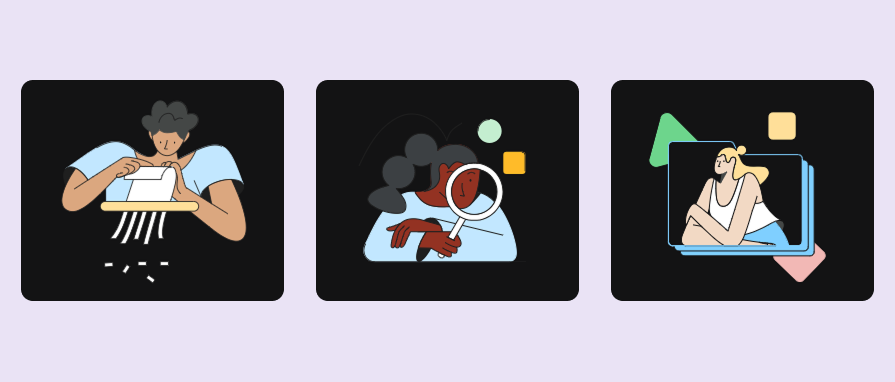
Diversity is the key. If you only show white men in your product photos and illustrations, do you think a black woman will feel it’s a product tailored for her?
On the other hand, if you ensure everyone can “see themselves” in your visuals every now and then, you’ll foster the “this product is also for me” type of feeling.
Here are some strategies to handle diversity in UX imagery:
- Use photos or illustrations with different nationalities, usually with different skin tones
- Randomize skin tones of character illustrations across the product, e.g., Google Drive uses diverse skin tones
- Change imagery dynamically based on known demographic factors like location and language
Cater to different ages
Different age groups have different needs and expectations. Ecommerce is the most prominent example here. Could you imagine selling beauty products without letting people filter by age? That would be quite hard.
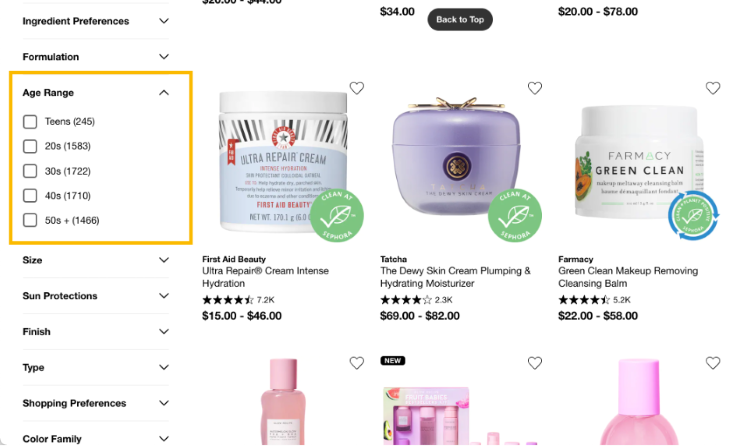
We can take this a step further. Suppose you are building a travel planning product similar to TravelPerk. In that case, you might also include different activity recommendations based on users’ age — that way, everyone, regardless of age, will have an easy time filling their spare time with amazing adventures.
Allow people to express their identity in their profile settings
In many products, the user’s profile serves as a digital reflection of their real-life personality. Make it easy for users to express themselves as they are.
Let’s look at how Slack helps build an inclusive virtual communication environment. First of all, users get the option to choose their preferred pronouns, which helps other people communicate with them the way they prefer. That’s a big inclusivity improvement!
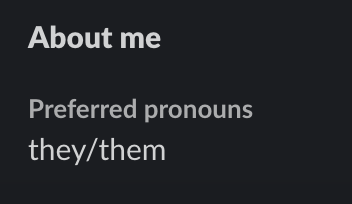
Slack also understands that not every name follows the standard American pronunciation rules. By enabling people to write down their pronunciation, Slack helps them be included from day one — no more awkward calls when you must remind people how to pronounce your name correctly:

Consider cultural differences with localization
Proper product localization is not only about translating the product UI into different languages. It’s also about catering to cultural differences in different countries.
Let’s take colors, for example. Although there are various guides on which colors convey which types of emotions, it’s not necessarily true for every culture. Yellow doesn’t always convey joy, and red doesn’t always convey energy.
For some cultures, somewhat cluttered page layouts are normal and easy to navigate, while others are used to as minimal and distraction-free designs as feasible.
A truly inclusive design considers these factors in localization:
- Colors you use
- The way you phrase sentences
- Type of photos and symbols you use
- Page layout
- Site navigation
Otherwise, if the product feels off and “not native” to them, users might feel they are not the product’s target group.
Google Doodles build up a friendly connection with the user by dynamically updating the Google logo based on national and cultural events:
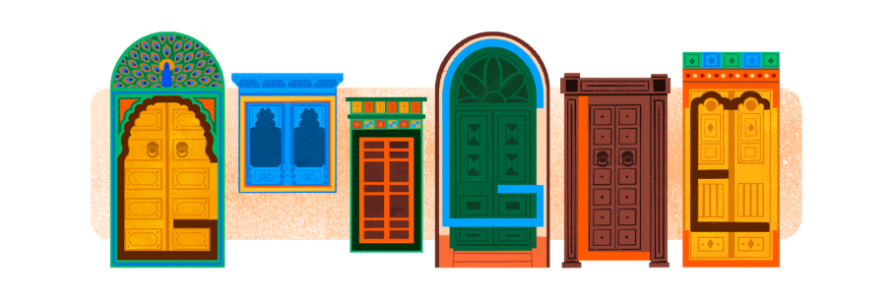
Effectively and ethically using ethnicity details creates a strong connection with the user.
Accept different names
Not every name follows the same naming convention.
A common example is banning the hyphen ( – ) symbol or special characters in name inputs. Believe me. Some people have them!
Having a minimal and maximal number of characters allowed is also a risky approach. There are people with as short names as “Ao,” and names as long as 747 characters. Alright, maybe a 700+ characters long name is an edge case, but you get the point: people can have really long names.
Although a bit of a rarer case, not every culture follows the “name” and “surname” conventions. Don’t leave them hanging. For example, Facebook has a special form for people whose name doesn’t fit their registration standards, and they provide concierge service to help them set up.
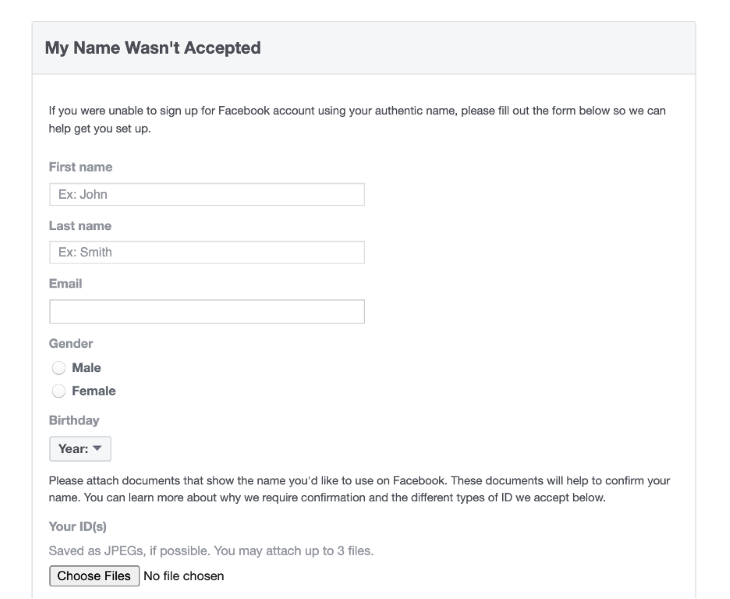
While having to fill out a separate form and wait for review isn’t the most frictionless user experience, it’s better than not offering such an option at all!
Consider next-generation AI-driven adaptive UX, personalization, and multimodal UX
Adaptive UX refers to creating highly usable and accessible digital products by dynamically adjusting the product interface and interaction based on the task context, user settings, device, system, and environment. Adaptive UX is an effective way to improve inclusiveness since its goal is to dynamically adjust the product to improve overall UX for everyone. Designers can implement adaptive UX with AI and use AI-driven adaptive personalization and multimodal UX to further improve inclusiveness and productivity for everyone, regardless of how unique they are.
Here are some practical examples in everyday digital products:
| Example | Concepts used |
| Google Maps’ driving mode uses a minimal, distraction-free interface with default voice output | Adaptive UX, multimodal UX |
| YouTube automatically creates search tags based on video history | Adaptive personalization |
| Uber changes vehicle types, pricing, and payment methods based on the country and region | Adaptive UX (via localization) |
| ChatGPT offers a voice mode and creates smooth context switching with the default text-entry mode | Adaptive UX, multimodal UX |
| PayPal’s landing page changes content and imagery based on location | Adaptive UX (via localization) |

This comprehensive guide helps you learn how to properly use AI to improve UX in any digital product.
Summary
Inclusive design is the new standard. Here’s what inclusivity does for your company:
- Serves a better user experience
- Improves user loyalty
- Reduces the number of complaints
- Increases your product reach
An inclusive design is one that’s usable, accessible, and caters to the different needs of diverse cultures and user demographics. And as a recap, these steps can help you achieve inclusivity:
- Building a truly accessible product
- Evolving accessibility with neurodiverse UX
- Respecting various demographic identifiers
- Including diverse nationalities in your photos and illustrations
- Catering for different ages
- Letting people express their unique personalities
- Accepting different names
- Using AI-driven adaptive UX, personalization, and multimodal UX
This is not a definitive list — inclusivity means different things for different products. It’s all about making different types of users, irrespective of their diverse personalities and demographics, feel heard, respected, and included.
Inclusive design is evolving. Start with basic accessibility requirements and inclusive design principles, then move toward neurodiverse UX and AI-driven adaptive UX, personalization, and multimodal UX to create a next-generation digital product that any human on earth can use productively and will stay engaged.
LogRocket helps you understand how users experience your product without needing to watch hundreds of session replays or talk to dozens of customers.
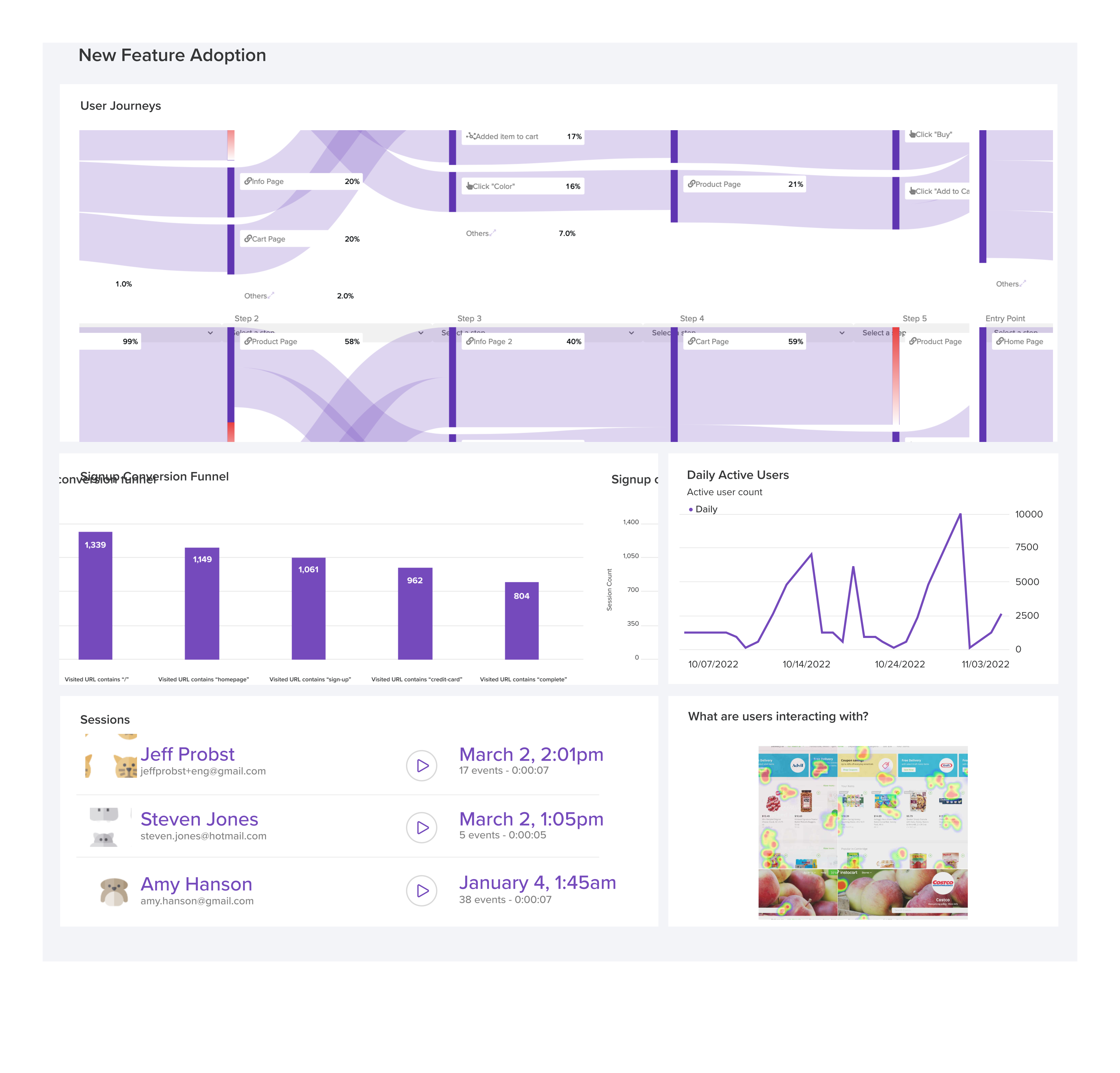
LogRocket’s Galileo AI watches sessions and understands user feedback for you, automating the most time-intensive parts of your job and giving you more time to focus on great design.
See how design choices, interactions, and issues affect your users — get a demo of LogRocket today.