How I automated the entire research-to-email pipeline using multi-agent AI
Imagine sending an email that says:
“Please research the impact of 5G on smart cities and send me a concise report.”
A few minutes later, an AI system has read your request, understood exactly what you need, searched the web for real information, written a structured report, reviewed it for quality, and emailed the finished result back to you — formatted and ready to read.
No manual searching. No copy-pasting between tabs. No summarizing at 11pm. Just a clean, professional research report waiting in your inbox.
That’s what I built using CrewAI — a multi-agent framework that lets you orchestrate a team of specialized AI agents the way you’d manage a real team of people.
Here’s the full architecture, how each piece works, and what actually happens behind the scenes when it runs.
What Is CrewAI?
CrewAI is an open-source framework for building multi-agent AI systems. Instead of stuffing everything into one giant prompt and hoping for the best, CrewAI lets you create specialized agents — each with its own role, goal, and tools — and connect them into a flow: a structured pipeline that passes data from one step to the next.
Think of it like hiring a small team:
- One person reads and understands the request
- Another does the research
- A third writes the report
- A fourth reviews it
- A fifth sends it
Each person is an expert at exactly one job. That’s the whole idea behind this automation.
The Problem
Getting a proper research report usually means:
- Reading the request
- Googling several queries
- Reading through a pile of articles
- Taking notes
- Writing it up
- Editing it
- Sending it
That’s a couple of hours, easily. With CrewAI, the same pipeline runs in minutes — with real web search data behind it, not hallucinated summaries.
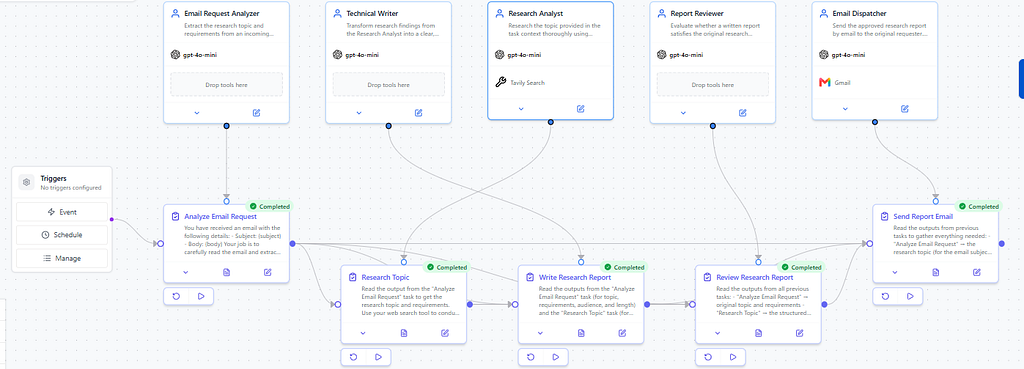
High-Level Architecture
Incoming Email (sender + subject + body)
        │
        ▼
Email Request Analyzer   → extracts topic & requirements
        │
        ▼
Research Analyst (Tavily) → gathers real findings
        │
        ▼
Technical Writer          → writes structured report
        │
        ▼
Report Reviewer           → quality checks the report
        │
        ▼
Email Dispatcher (Gmail)  → sends formatted HTML report
Only two external integrations are involved: Tavily Search for live research and Gmail for delivery. Everything else is pure LLM reasoning.
Flow State: The Glue Holding It Together
One of the most important ideas in CrewAI Flows is state — a shared structure that carries information across every step.
FieldDescriptionsenderRequester's email addresssubjectEmail subject linebodyEmail body textresearch_topicExtracted topicresearch_requirementsExtracted requirementsresearch_resultStructured findingswritten_reportDraft reportreview_resultApproval status + feedbackfinal_reportApproved reportemail_statuspending / sent / failed
The key design decision: only sender, subject, and body are external inputs. Everything else is generated and passed internally. That keeps the system clean and removes the temptation to add unnecessary manual steps.
Meet the Agents
1. Email Request Analyzer
Reads the subject and body, identifies the research topic, and extracts requirements like length, audience, tone, and sub-topics — returned as structured JSON:
{
  "topic": "Impact of 5G on Smart Cities",
  "output_type": "research_report",
  "length": "concise",
  "audience": "general",
  "requirements": [
    "How 5G enables smart-city applications",
    "Benefits for transportation and healthcare",
    "Key challenges like cybersecurity and cost",
    "Real-world examples"
  ],
  "is_valid_request": true
}
If the email isn’t actually a research request, this agent flags it and the flow stops — no wasted compute downstream.
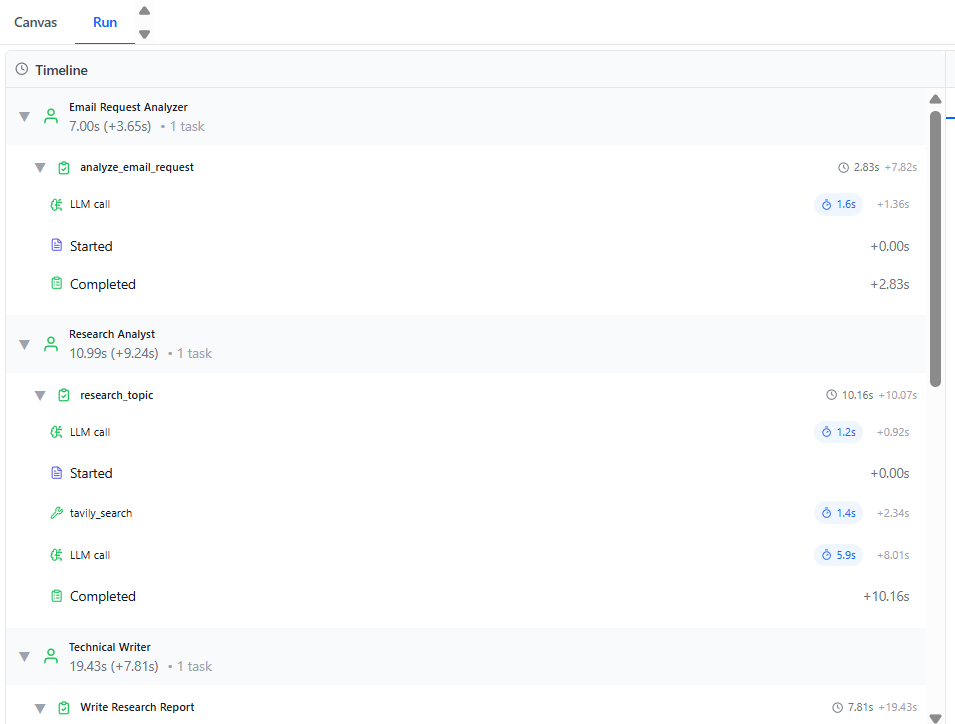
2. Research Analyst
Uses the Tavily Search API to run targeted web searches on the extracted topic. Tavily is built specifically for AI agents — it returns clean, summarized, LLM-friendly results instead of raw search-engine clutter, which makes it a much better fit here than a general search API.
This agent is explicitly instructed to never fabricate facts — it only reports what it actually finds.
3. Technical Writer
Takes the research findings and the original requirements and turns them into a complete markdown report: title, intro, key findings, examples, conclusion — matched to the requested tone, length, and audience. It’s not allowed to invent anything beyond what the Research Analyst provided. This agent is the bridge between raw data and something a human actually wants to read.
4. Report Reviewer
The quality gate. It checks the report for relevance, completeness, clarity, factual consistency, and formatting, then returns a structured verdict:
{
  "approved": true,
  "score": 9,
  "issues": [],
  "revision_instructions": []
}
Importantly, the reviewer never rewrites the report — it only evaluates. Keeping generation and evaluation separate is one of the core architectural decisions here.
5. Email Dispatcher
Converts the approved markdown report into clean HTML (## → <h2>, **bold** → <strong>, bullet lists → proper <ul><li>, paragraphs wrapped in <p>, styled with a readable font and max-width), writes a short friendly intro, and sends it through Gmail with is_html: true. It then confirms delivery success or failure back into the flow state.
How Data Actually Moves Between Agents
This is the part people misunderstand most about CrewAI: agents don’t automatically share information. You have to explicitly wire task outputs into task inputs using the context attribute.
Analyze Email Request
        │ context
        ▼
Research Topic
        │ context
        ▼
Write Research Report   ← also uses context from Analyze Email Request
        │ context
        ▼
Review Research Report  ← uses context from all three above
        │ context
        ▼
Send Report Email       ← uses context from Analyze + Write + Review
Every downstream agent gets exactly the context it needs — nothing more. No hidden state, no implicit sharing. That’s what makes the whole flow debuggable.
What a Real Run Looks Like
Input:
sender: jaydeep@example.com
subject: Research Request
body: Please research the impact of 5G on smart cities. Cover how 5G
enables smart-city applications, benefits for transportation, healthcare,
public safety, and IoT, challenges like cost and cybersecurity, and
real-world examples.
- Email Request Analyzer extracts the topic and five specific requirements.
- Research Analyst searches the web via Tavily and returns findings on NYC traffic optimization, Barcelona smart lighting, healthcare IoT, and cybersecurity risk.
- Technical Writer produces a structured markdown report with intro, findings, examples, and conclusion.
- Report Reviewer approves it with a score of 8.
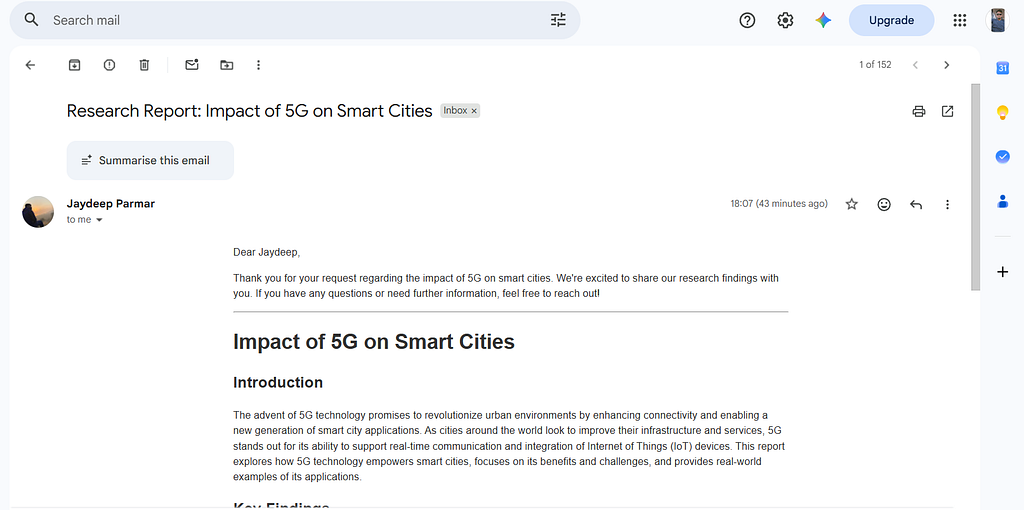
- Email Dispatcher converts it to HTML and sends it to jaydeep@example.com.
Result: a clean, professional research report lands in the inbox — proper headings, bullets, and sections — with zero manual work in between.
Key Design Principles
- Single responsibility per agent. The researcher doesn’t write, the writer doesn’t review, the reviewer doesn’t send. Easy to debug, easy to extend.
- No-hallucination policy. The writer is limited to what the researcher actually found; the reviewer double-checks factual consistency.
- Explicit data handoffs. Every dependency is declared in context — nothing is assumed.
- Minimal external integrations. Just Tavily and Gmail. No database, no CRM, no calendar, no Slack.
- Clean output only. The user gets the final report — not the review JSON, not agent reasoning, not internal metadata.
Tools Used
- CrewAI Studio — building and running the multi-agent flow
- Tavily Search API — real-time web research
- Gmail API (Composio) — sending the final formatted report
- OpenAI GPT-4o-mini — LLM powering all agents
Real-World Use Cases for This Pattern
The research-to-email pipeline is really just one instance of a broader pattern: request in → specialized agents collaborate → polished output out. Once it’s built, it’s easy to repoint at other problems:
- Competitive intelligence digests — email a company name, get back a structured summary of recent news, funding, and product moves.
- Market research on demand — sales and product teams fire off a topic and get a report before their next meeting, instead of waiting on an analyst.
- Internal knowledge requests — swap Tavily for an internal search tool and point the same flow at company docs, wikis, or Slack history.
- Content briefs for writers — content teams request a topic and receive a research-backed brief, complete with examples and sources, ready to hand to a human writer.
- Customer-facing report generation — SaaS products could let users request a custom report by email or in-app request, with the crew handling research and formatting behind the scenes.
- Recurring briefings — put the same crew on a schedule to auto-generate a weekly report on a standing topic (a market, a competitor, a technology trend) with zero manual triggering.
The five-agent shape — analyze, research, write, review, deliver — generalizes well anywhere a request needs to turn into a trustworthy, well-formatted piece of writing.
Why CrewAI?
Single giant prompts don’t scale. Ask one model to read an email, research a topic, write a report, and send an email all in one shot, and quality drops — it tries to do everything at once and does none of it particularly well.
Breaking the problem into specialized agents with clearly scoped responsibilities means each step gets the model’s full attention. The researcher only researches. The writer only writes. The reviewer only reviews. The result is noticeably better than any single-prompt approach — and the system stays understandable, debuggable, and easy to extend.
Conclusion
This project shows just how much you can automate with surprisingly few moving parts:
- 5 agents, each with a clear, focused role
- 5 tasks, with explicit data handoffs
- 2 external tools (Tavily + Gmail)
- 3 runtime inputs (sender, subject, body)
The system handles the entire pipeline — from reading an email to sending a fully formatted HTML report — with no human intervention required.
This is what multi-agent AI looks like in practice: not a chatbot, not a single clever prompt, but a small coordinated team of specialized agents doing one real job well.
Built with CrewAI Studio · Tavily Search · Gmail API · OpenAI GPT-4o-mini
Tags: #CrewAI #AIAgents #LLM #Automation #Python #ArtificialIntelligence #MultiAgent #OpenAI #EmailAutomation #Tavily
Before you go
- Please take a moment to like the post and follow the writer!
- Did you know that over 400,000 developers share what they’re building, learning, and discovering across our platforms every month? Learn how you can contribute here.
Building an AI-Powered Research Email Assistant with CrewAI was originally published in Stackademic on Medium, where people are continuing the conversation by highlighting and responding to this story.